The Choice Gap
A public diagnostic funnel that helps local businesses name the gap between being found and being chosen.
Primary outcome
Gives local operators a clear name for the gap between being found and being chosen, and a concrete recommended next step.
What the operator can do
Run a free scan, name the gap between being found and being chosen, and get a focused report with a concrete next step — without a consultant or a 40-question audit.
Product evidence
What the system looks like
Real screenshots are used for public systems. Private systems use clear system posters until approved screenshots are available.
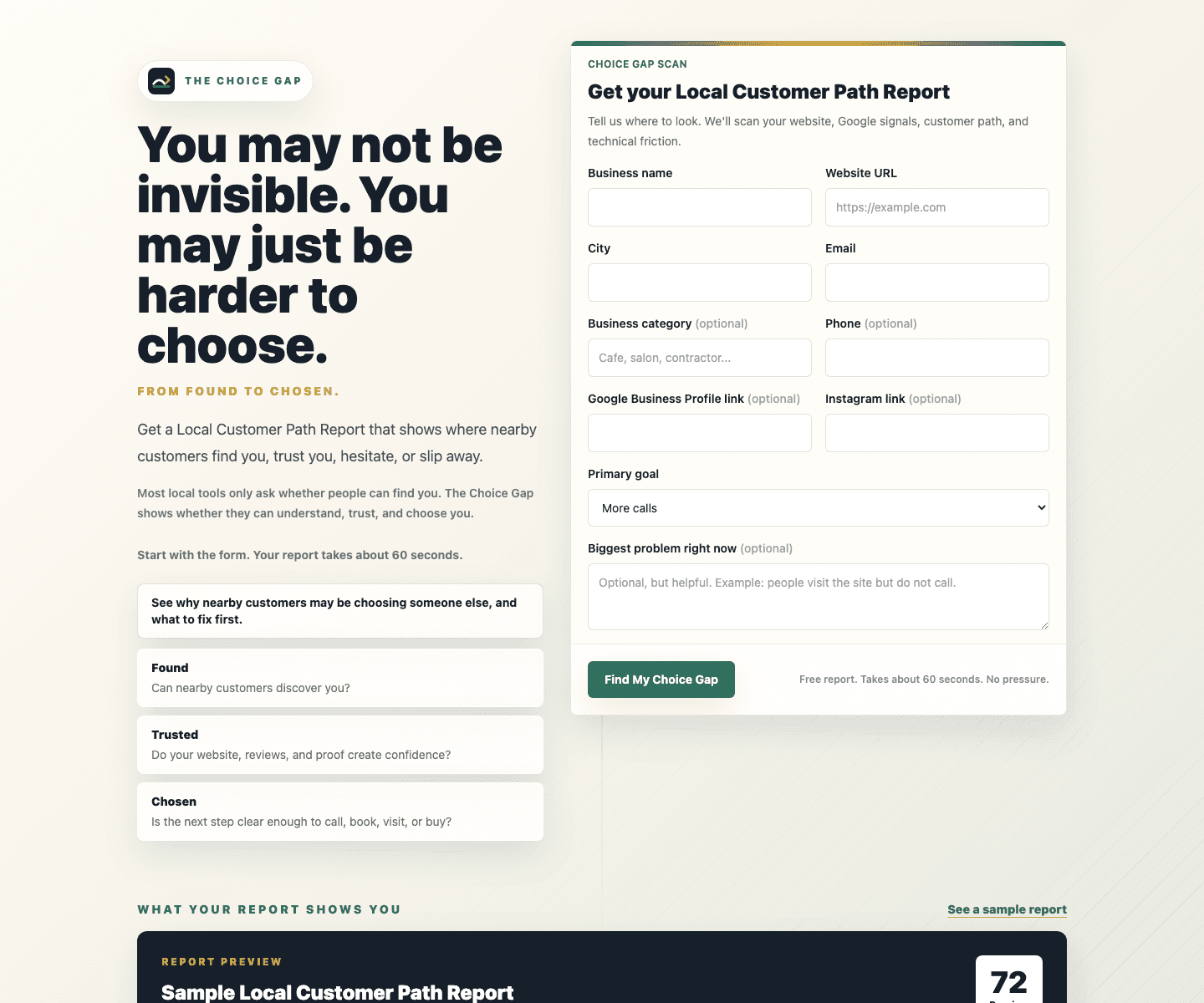
Public scan landing on thechoicegap.com captured at 1440 width from a real public URL.
Visitor scan path
- 1Land on the public scan page
- 2Walk through guided intake
- 3See your Choice Gap report
- 4Get a concrete next recommended step
thechoicegap.com
Problem
Most local operators know something is leaking between search, trust, and follow-up, but they do not have a simple way to name the gap or decide what to fix first.
Solution
A focused scan and report flow that turns messy online presence signals into a practical Choice Gap summary, then gives Flowdrive enough context for useful follow-up.
Impact
Creates a cleaner bridge from attention to action: the visitor gets language for the problem, and Flowdrive gets enough context to recommend the right next step.
Before this existed
What this system replaced
What it replaced
- Generic lead forms that collect a name and email with no diagnostic context
- One-off business audits that land in a PDF no one acts on
- Cold outreach that starts without knowing what the operator actually needs
- Scattered discovery-call notes that never become a usable summary
What it actually is
A closer look at the system
The Choice Gap is the public front door of the Flowdrive ecosystem. It uses a guided intake to help a local operator describe what they offer, who they serve, where they are losing momentum, and what they have already tried. The intake then feeds a structured diagnostic and report flow that turns vague online-presence frustration into a clear list of decisions and a recommended next step. Each completed scan also produces a CRM-safe summary that syncs into the Flowdrive Command Center so follow-up has context instead of starting cold.
Operator view
What it feels like to use
An operator using The Choice Gap gets a guided diagnostic that feels like a conversation, then sees a focused report they can react to. They do not need to interpret raw analytics, score themselves, or fill out a generic contact form. On the Flowdrive side, the sales team sees a structured snapshot of the same scan and can decide whether to send a short message, book a working session, or wait.
Inside the admin
What the operator side of this system can actually do
Each completed scan creates a CRM-safe diagnostic snapshot in Flowdrive.
Sync endpoint is auth-guarded and event-based, not a shared database read.
Snapshots are stored on the matched Lead, Company, and Contact records.
How it works
The workflow from end to end
Workflow steps
- 01Visitor lands on the public scan page and reads the framing.
- 02They walk through guided intake questions about their business, channels, offer, and signals.
- 03The system scores and shapes a Choice Gap report focused on what to fix first.
- 04The report is shown to the visitor, with a clear next step they can take.
- 05A CRM-safe snapshot is synced into Flowdrive Command Center via the internal sync endpoint.
- 06Flowdrive admin uses that snapshot to decide and execute a useful follow-up.
Under the hood
System modules and current build status
System modules
Labels show what is actually built today versus in progress or planned.
- Guided diagnostic intakeBuilt
Public-facing flow that gathers the operator's offer, audience, channels, and pain in a structured way.
- Choice Gap report engineBuilt
Scoring and report shaping that turns raw answers into a focused, plain-English summary.
- Flowdrive sync endpointBuilt
Internal POST endpoint that delivers a CRM-safe snapshot into Flowdrive Command Center.
- Stronger report examplesIn progress
Refining the report's before/after presentation and recommended-next-step language.
Where it fits
Business use cases this pattern fits
Use cases
- Local service business that wants a clearer diagnosis before they buy anything.
- Operator who is doing the work but cannot tell where the leak is between found, trusted, and chosen.
- Owner who is tired of generic audits and wants a focused conversation instead of a lead form.
- Flowdrive itself, as a credible intake before custom systems work.
Capabilities
- guided business intake
- diagnostic scoring
- report preview flow
- Flowdrive CRM sync
- follow-up context capture
Proof points
- public diagnostic funnel
- internal sync path into Flowdrive CRM
- structured report and lead context
What it proves
- AI can make local business discovery more useful when it is tied to a clear workflow.
- A diagnostic can become sales infrastructure without feeling like a generic lead magnet.
Next milestones
- tighten report examples
- capture stronger before-and-after proof
- connect more follow-up actions inside Flowdrive
Could this work for you?
How this pattern applies to other businesses
Works as an intake funnel for any business that wants to turn a free diagnostic into a qualified lead and a warm first conversation.
Build a diagnostic systemWant a system shaped around your workflow?
If your team is juggling spreadsheets, forms, follow-up, content, billing, or customer context across too many places, Flowdrive can help turn it into a practical tool.